Film Core Basic
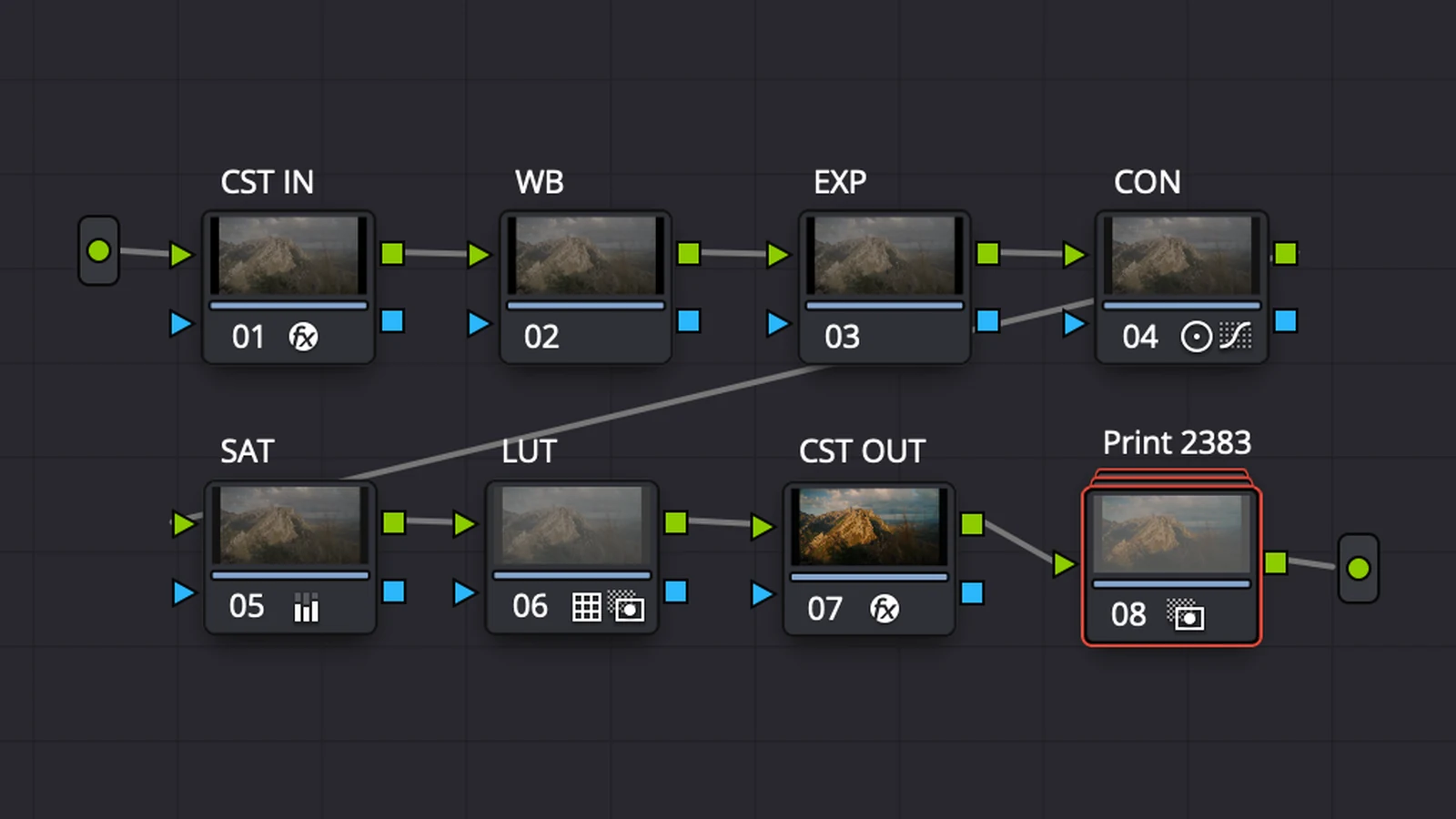
Der Farblook in einem reduzierten Node-Aufbau. Für DaVinci Resolve Free und Studio.


Film Core Basic
Der Farblook in einem reduzierten Node-Aufbau. Für DaVinci Resolve Free und Studio.
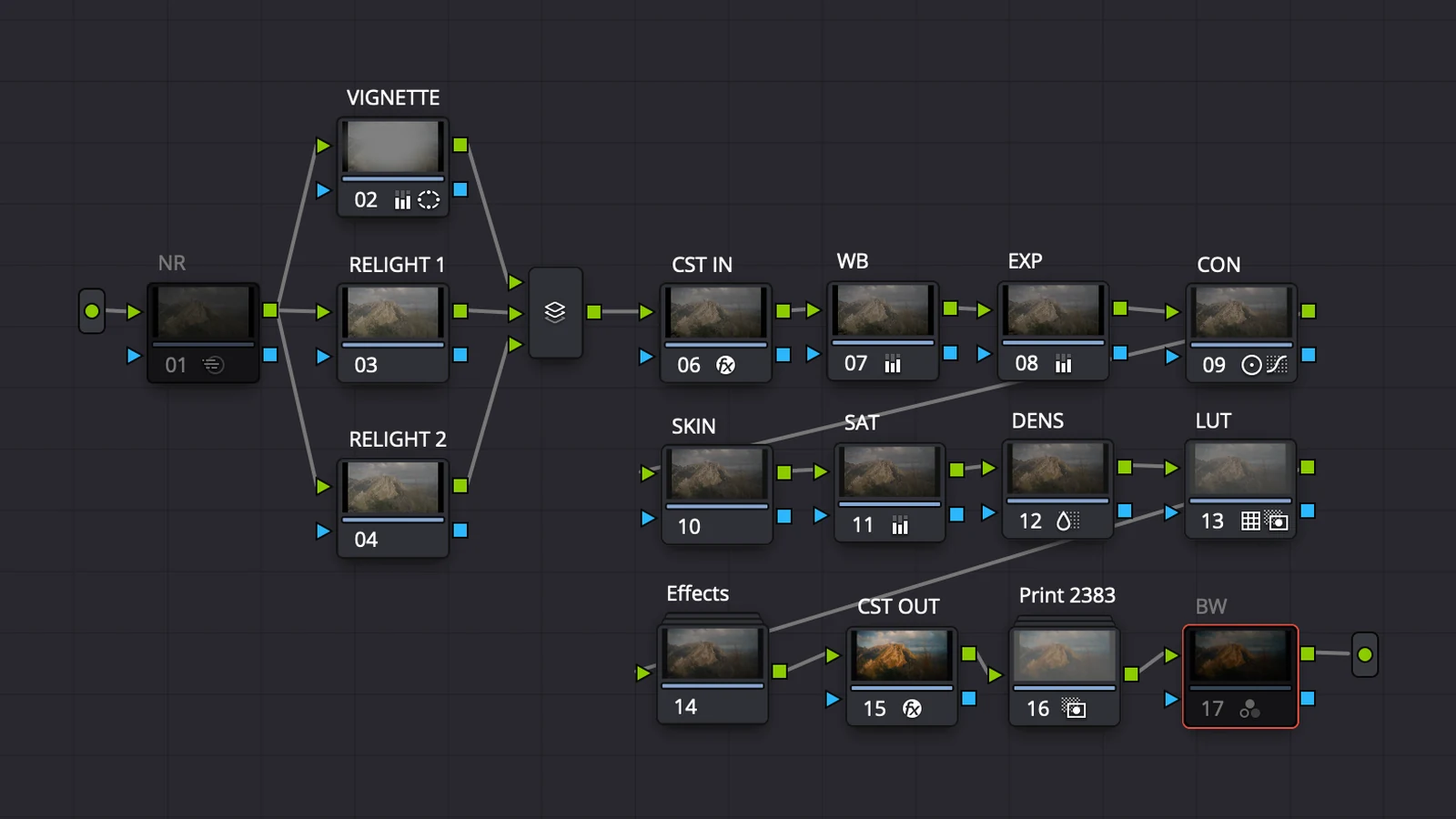
Film Core Pro
Der erweiterte Node-Aufbau mit Werkzeugen für Korn, Halation, Licht und Hauttöne. Benötigt DaVinci Resolve Studio.
“I'm a creator and freelancer, and I've tried many different PowerGrades and bundles, but this one is something special. The colours have a really cinematic, dense look without feeling oversaturated. In my opinion, it has the perfect balance between rich colours and a natural image. It's also super easy and simple to use, which makes it fit perfectly into my workflow.”

“Film Core is really complete. You not only get a basic version for easy and quick color grades but also a full one, if you’re looking to fine-tune the colors on your videos and get them to the next level. The optional black and white effect is a very nice touch too and allows for some creative looks. Everything is very well documented and Lua is responsive if you have any questions. Whether you’re starting out or already advanced as a creator, you’ll find the secret sauce to high-end cinematic colors here.”

“I’ve already used the Power Grades on a few projects and I’m genuinely super happy with them. I especially love that you get both a simple workflow for quick grades and a more advanced setup when you really want to fine-tune the look. The included tutorials are incredibly helpful and explain everything clearly, from installation to the full grading workflow. It doesn’t feel like another generic LUT pack where you just apply a look and hope for the best.”

Der Workflow verwendet DaVinci Wide Gamut / Intermediate und braucht den richtigen Eingangsfarbraum für dein Material. Stelle Kamerafarbraum und Gamma passend zur Aufnahme ein. Falls du unsicher bist, schick mir vor dem Kauf dein Kameramodell und Aufnahmeprofil.
Die PowerGrades und ihre einzelnen Arbeitsschritte bleiben DaVinci Resolve vorbehalten. Die Rec.709-LUT kannst du auch in anderen Programmen nutzen, die .cube-LUTs unterstützen. Dafür muss dein Material zuerst passend nach Rec.709 umgewandelt sein.
Für Film Core Basic ja. Film Core Pro verwendet Funktionen aus DaVinci Resolve Studio. Beide PowerGrades sind im Paket enthalten.
Basic konzentriert sich auf den Farblook und die grundlegenden Anpassungen. Pro ergänzt unter anderem Filmkorn, Halation, Werkzeuge für Hauttöne und eine Schwarzweiss-Option. Der grössere Aufbau bietet mehr einzelne Eingriffsmöglichkeiten.
Eine LUT enthält eine festgelegte Farbtransformation. Ein PowerGrade speichert einen bearbeitbaren Node-Aufbau in DaVinci Resolve. Damit kannst du die einzelnen Arbeitsschritte anpassen, etwa Belichtung, Kontrast und Farbgestaltung.
Ja, prüfe zuerst den Eingangsfarbraum und passe Belichtung, Weissabgleich und Kontrast an. Film Core gibt dir einen Ausgangspunkt. Das Licht und dein Material bestimmen mit, wie das Ergebnis aussieht.
Du erhältst Basic und Pro als .drx-PowerGrades mit .dpx-Referenzbildern sowie eine Installationsanleitung und Zugang zur Film Core Academy. Dazu kommen zwei .cube-LUTs für DaVinci Wide Gamut / Intermediate und Rec.709.
Die Videos zeigen Installation, Farbmanagement und die Arbeit mit Basic und Pro. Du siehst, wie du den Aufbau verwendest und den Look an deine eigenen Aufnahmen anpasst.
Schreib an hello@luahell.com und beschreibe das Problem. Nenne bitte das verwendete Programm und die Version, damit ich den Fehler besser nachvollziehen kann.